Product tour
Real screens, not marketing mockups
Every screenshot below is the actual extension UI.
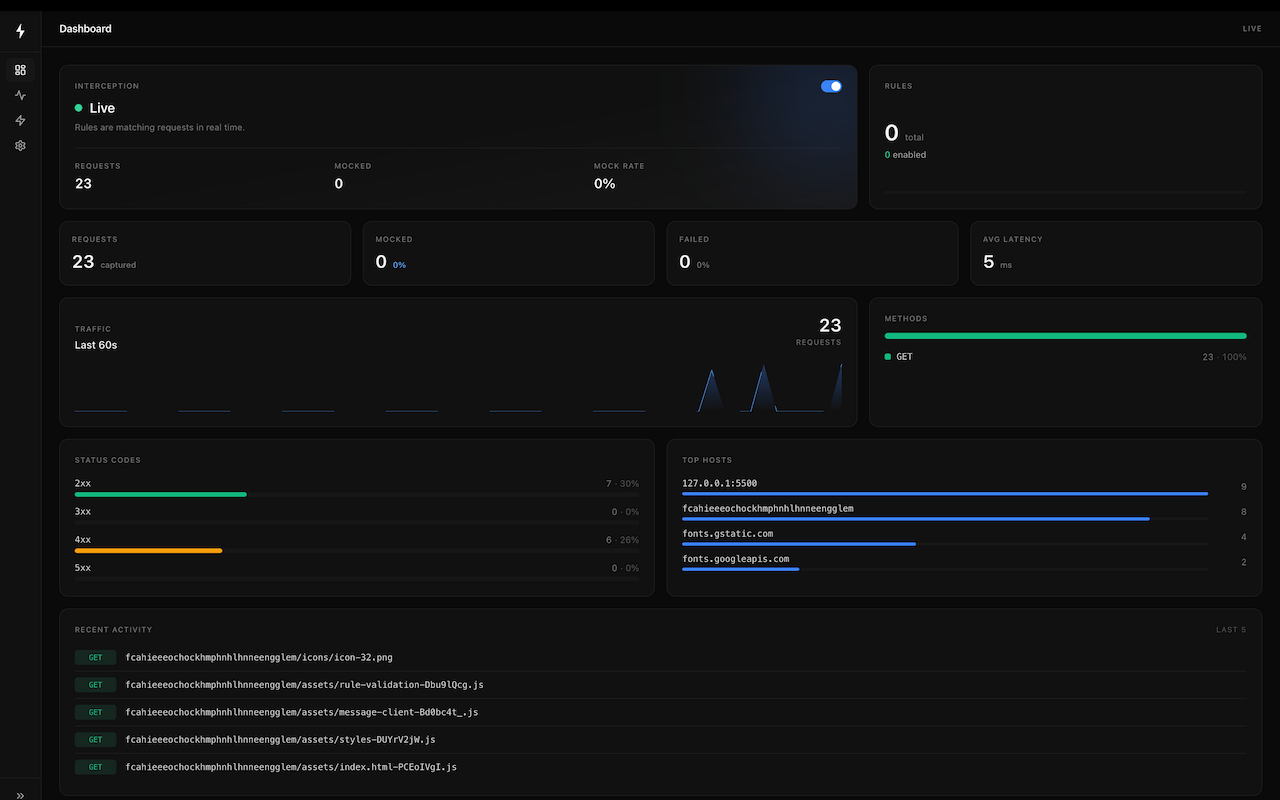
A developer tool for capturing, inspecting, and mocking network traffic - REST and GraphQL - without a proxy or backend changes.
No proxy setup. No backend changes. All data stays on your device.
Every screenshot below is the actual extension UI.
Syncmock is most useful when your backend is incomplete, unstable, slow, or simply out of your control.
Keep moving when the backend contract exists on paper but not in production. Model happy paths, failures, slow states, and partial payloads without waiting for another team.
Many bugs only show up under specific response shapes or headers. Syncmock makes those scenarios repeatable so testers and PMs can validate edge cases without needing custom backend flags.
When you depend on Stripe, Auth0, Shopify, internal gateways, or any external partner API, you rarely control availability or shape changes. Syncmock gives you a safe simulation layer inside the browser.
Sometimes you need to answer one question fast: “what happens if this request returns different data?” Syncmock is a safer, faster loop than adding temporary code paths or branching your backend.
Six tools in one extension. No proxy server, no certificates to install, no backend code to touch.
Every request and response streams into a panel in real time. Filter by method, status, URL, or mocked-only. Inspect headers and body with zero latency.
fetch · XHR · webRequestReturn any JSON body, status code, and headers - before the real request ever leaves the browser. Perfect for frontend development without a live backend.
mock-rest · mock-graphqlLet the real request fly, then swap the response body before the page sees it. Test edge cases and error states against your actual backend.
override-response-bodyPoint API calls to a different host, path, or port without touching source code. Great for routing staging traffic to local servers or vice versa.
redirect · replace-urlInject, override, or remove any request or response header. Add auth tokens, CORS headers, feature flags - without rebuilding the app.
modify-request-headersPaste a request, describe what you want, and get a ready-to-use rule. Uses your own AI endpoint - your data never goes anywhere unexpected.
local · BYO key · optionalMost competitors are either proxy-first, cloud-first, or limited to simple redirects and canned mocks. Syncmock is designed around a different idea: keep everything in the browser, expose full request/response visibility, and let developers mix declarative speed with body-level control.
Use a proxy when you need full machine-wide traffic control. Use a mock server when you need shared backend simulation. Use Syncmock when you need instant browser-side interception with no proxy, no certificate ceremony, and no loss of request/response context.
Syncmock does something many tools do not: it combines Chrome's declarative network layer with a MAIN-world page bridge. That means fast rule execution for redirects and headers, plus real body-touching control for fetch and XHR when you need to override or fully mock responses.
All rules, settings, and captured traffic live on your device. There is no Syncmock cloud, no hidden telemetry, and no account wall before you can use the product.
Most tools push you toward duplicating rules for every scenario. Syncmock supports named variants on a rule, so you can keep one matcher and switch between success, empty, slow, and error states without creating rule sprawl.
Rules and captured traffic are stored in your browser's local storage. There is no account, no cloud sync, and no telemetry - your requests never leave your machine.
No configuration file, no proxy certificate, no server to run.
Add Syncmock from the Chrome Web Store. Click the toolbar icon to open the popup and enable interception. That's the only setup required.
Define a matcher (URL, domain, method, header, GraphQL operation) and pick an action - mock, override, redirect, or modify headers. Name it, save it, done.
Reload the page. The Network panel shows matched requests highlighted. The dashboard counts what was mocked and how fast. Toggle rules on and off in real time.
Each rule pairs a matcher (how to detect a request) with an action (what to do with it). Rules run in priority order. Variants let you switch between multiple response scenarios without editing the rule.
The site now says it clearly, not just in structured data.
No. Syncmock runs in the browser as a Chrome extension, so it can intercept and reshape requests exactly where your frontend experiences them. That makes it much faster for UI debugging than standing up a separate mock backend.
No. It works with REST and GraphQL, and it observes both fetch and XMLHttpRequest. You can match on GraphQL operation names, modify headers, replace URLs, or fully mock responses.
You can use it on any site you control or are authorized to test. It is a developer tool, not a license to intercept unauthorized traffic. Use it responsibly and in line with the target application's terms and your own policies.
By default, nothing leaves your machine. Rules and settings are stored locally in Chrome. The only time traffic can be sent elsewhere is when you explicitly trigger the optional AI feature using an endpoint you configured yourself.
Add Syncmock to Chrome. Create your first rule. Ship faster.